Transactional email API.
The reliable way to reach inboxes instead of spam folders. Send transactional and marketing email with a message log you can read, Resend-compatible requests, and guardrails strict enough that an AI agent can hold a key: a budget on every key, a kill switch, refusals that name the fix.
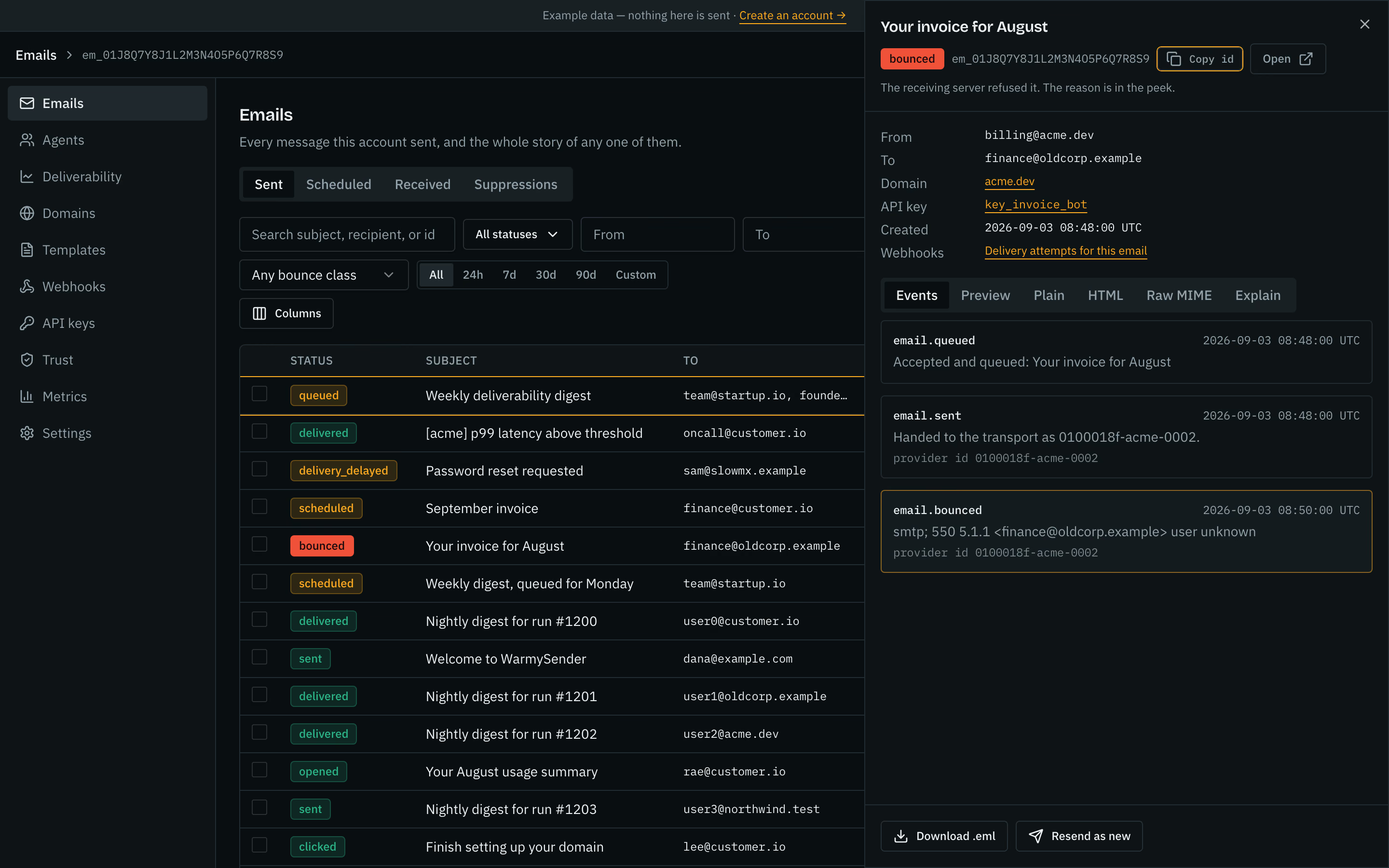


Every send, every status. The bounced invoice carries its reason.
Audience, Broadcasts and Automations are in the console too: contacts, segments and topics, broadcasts, automations.
For agent builders
Run it from Claude Code, Cursor, or any MCP client. Budgets are on before the first send.
Agents →For product teams
Node, Python, REST. Every email's story in the console, every filter in the API.
Quickstart →For platforms
Per-key budgets and a kill switch per sender; the trust ladder pauses a sender that hurts shared reputation.
Enforcement →Every email, and why
Twelve statuses, each filterable, each row opening the delivery reason and the raw MIME behind it.
A budget per sender
Each key gets a budget (monthly by default, or hourly or daily) and a per-minute ceiling. One button pauses every key at once.
Your bot asked to send one email too many.
A bot stuck in a loop can send ten thousand emails before anyone notices. Here is one that tried.
- 9:14aminvoice-bot sends its 200th email this month
Receipts, password resets, invoices — all fine, all delivered.
- 9:14amIt asks to send one more
You had capped it at 200 this month. This is number 201.
- 9:14amWe stop it. The email never leaves
No partial send, no queue to clean up. Nothing reached anyone.
- 9:14amThe bot is told to stop and wait. You get an email
Your other two bots keep sending. invoice-bot has hit its ceiling.
Your console, right now
9:14amLimit reached. The next send is refused.
One click. Every bot stops sending until you say otherwise.
Warned before enforced
A warning names the domain, the measured rate and the threshold it crossed, before anything is paused.
DNS you can copy
Every record with a copy button and the state of the last check, so a failed verification says which record is wrong.
Failed deliveries, replayable
Each attempt logged with the response your endpoint returned, and a dead letter you can replay once it is healthy.
When an email doesn’t arrive, we tell you why.
Sending is easy. Landing in the inbox instead of the spam folder is the hard part. We recompute yours on every visit and recheck your DNS every 6 hours.
How yourapp.com is doing
Needs a lookOne that didn’t arrive
Gone for goodThis mailbox doesn’t exist any more — the person has probably left the company.
their mail server said: 550 5.1.1 user unknown
“Sent” and “read” are not the same thing. We show you the gap.
Some things should wait for a human.
Repeats the loop guard catches, and any send an agent asks about first, wait in a queue until someone answers.
Waiting on you
2 pendingIf something goes wrong
Every step is published and emailed, with the numbers.
- 1A webhook event fires at 80% of a key budget and at 80% of the plan inclusion.
- 2If it keeps going, we pause it — and tell you exactly why.
- 3Nothing starts again on its own. You decide.
Every pause names its reason and how to appeal it. That policy is published, and we hold ourselves to it.
Why not just Resend?
The same email API, with brakes.
Everything you expect from an email API. Plus the limits, the approval queue, and a stop button for every key at once.
| What matters | AgentiSend | Resend |
|---|---|---|
| A spending limit per bot | Every key carries a cap and a speed limit, enforced as the email goes out | Keys grant access, not limits — nothing caps what one can spend |
| Stop everything at once | One click pauses every key on the account | Delete keys one at a time |
| A retry never sends twice | Works on every action that changes something, remembered for 7 days | Only on the send call |
| One bad address never kills the batch | 499 go out, 1 comes back with the reason it did not | Strict by default; per-item errors only if you opt in |
| Search what you have sent | By status, sender, recipient, domain, which bot, and date | A list of recent sends, without those filters |
| Errors that say how to fix them | Every refusal names the exact call that repairs it | A code and a message |
| What matters | AgentiSend | AgentMail |
|---|---|---|
| What it is for | Sending email, with brakes your bots cannot remove | Giving agents an inbox, so they can read and reply |
| Keeping you out of spam | Bounce and complaint rates per domain over a rolling 7 days, and the fix to run | Not what they set out to build |
| How you pay | A Free plan with no card and no expiry (5,000 emails a month), then from $9 a month; sending pauses at the inclusion unless an owner turns overage on. The table is on /pricing | Per inbox |
| What matters | AgentiSend | sending it yourself |
|---|---|---|
| Getting the first email out | Three lines of code; we write the DNS records for you | Wire up permissions, config sets and tenants yourself first |
| Somewhere to look when it breaks | Messages, what happened to them, and your health — one screen | Separate consoles for mail, logs and DNS |
| When an address bounces | Sorted, added to the do-not-send list, and explained | A raw notification you have to decode yourself |
| Who actually delivers it | Our own mail transfer nodes, on IPs we warm, in the US today. EU sending is on the roadmap. | Whoever you wired up |
The sourced rows, with the page each figure came from, are on the full compare page:/vs/resend
Developer experience
First email in under a minute
import { AgentiSend } from "agentisend";

const as = new AgentiSend(process.env.AGENTISEND_API_KEY);
const userId = "usr_42"; // the account you are welcoming

const r = await as.emails.send({
  from: "hello@yourapp.com",
  to: "user@example.com",
  subject: "Welcome",
  html: "<p>You are in.</p>",
}, { idempotencyKey: "welcome-email/" + userId });

console.log(r.id); // -> GET /emails/:id for the event log
The Node sample and the Python sample are run by the test suite against a local AgentiSend server. The curl sample sends the same request, and the suite posts that body too.
For agents: one line
claude mcp add agentisend \
  --env AGENTISEND_API_KEY=as_… \
  -- npx @agentisend/mcp-server
MCP + Skills surfaces built in; the agent gets the same error contract you do, including the fix field.
Machine-readable docs
llms.txt and an OpenAPI spec generated from the same schemas that validate requests, so they cannot drift.
Per-page .md twins ship. Asking the HTML URL for Markdown waits on the edge config.
Pricing
Every tier, every limit, on the page.
Every price and every limit is on this page — there is no “contact us to find out what it costs”. Paid plans start at $9 a month. Pro and Scale sell larger volumes on the same plan, each cheaper per 1,000 than the one below, and the same table is published at /pricing.json.
Free
- Up to 170 a day
- Up to 3 sending domains
- 1 seat (the owner)
- History kept 7 days
- Sending pauses at 5,000. No extra charge.
- Unlimited keys with budgets
- Webhooks with replay
- Approval queues
- Deliverability panel: bounce and complaint rates per domain
Starter
- No plan daily cap; delivery paced per inbox provider
- Up to 3 sending domains
- 3 seats, owner/admin/viewer, never billed per seat
- History kept 30 days
- Past 30,000: pauses, or $0.75 per 1,000 extra if you turn overage on
- Everything in Free
Pro
- No plan daily cap; delivery paced per inbox provider
- Up to 10 sending domains
- 10 seats, owner/admin/viewer, never billed per seat
- History kept 90 days
- Past 50,000: pauses, or $0.72 per 1,000 extra if you turn overage onPast 100,000: pauses, or $0.72 per 1,000 extra if you turn overage on
- Everything in Starter
Scale
- No plan daily cap; delivery paced per inbox provider
- Up to 1,000 sending domains
- 100 seats, owner/admin/viewer, never billed per seat
- History kept 180 days
- Past 100,000: pauses, or $0.60 per 1,000 extra if you turn overage onPast 200,000: pauses, or $0.60 per 1,000 extra if you turn overage onPast 500,000: pauses, or $0.60 per 1,000 extra if you turn overage onPast 1,000,000: pauses, or $0.60 per 1,000 extra if you turn overage onPast 1,500,000: pauses, or $0.60 per 1,000 extra if you turn overage onPast 2,500,000: pauses, or $0.60 per 1,000 extra if you turn overage on
- Everything in Pro
- Dedicated IP on request
- Support first reply within 4 business hours
Lifetime plans
Lifetime 250k
- Up to 25,000 a month: 10 months at the maximum
- Up to 3 sending domains
- 3 seats, owner/admin/viewer, never billed per seat
- History kept 30 days
- Past 25,000 a month: pauses until the period resets. No overage.
- Starter’s domains, seats and history
Lifetime 600k
- Up to 50,000 a month: 12 months at the maximum
- Up to 10 sending domains
- 10 seats, owner/admin/viewer, never billed per seat
- History kept 90 days
- Past 50,000 a month: pauses until the period resets. No overage.
- Pro’s domains, seats and history
Lifetime 1.5M
- Up to 100,000 a month: 15 months at the maximum
- Up to 10 sending domains
- 10 seats, owner/admin/viewer, never billed per seat
- History kept 90 days
- Past 100,000 a month: pauses until the period resets. No overage.
- Pro’s domains, seats and history
Lifetime 3M
- Up to 100,000 a month: 30 months at the maximum
- Up to 10 sending domains
- 10 seats, owner/admin/viewer, never billed per seat
- History kept 90 days
- Past 100,000 a month: pauses until the period resets. No overage.
- Pro’s domains, seats and history
One payment for emails that never expire, sent at up to a monthly maximum. When the emails are used up, sending stops until you buy a monthly or yearly plan. A larger lifetime plan costs the difference. Refunded in full if you ask before any email is sent on the plan. Once one is sent, it is not refundable.
FAQ
Questions people ask before they switch
AgentiSend is a transactional email API for applications and AI agents: verify a domain, create a key with a budget, send over REST or MCP, and read a log that says what happened to every message. Every key carries a send budget, a send the loop guard flags waits for a person, and one request pauses every sender. The docs are at https://agentisend.com/docs and the API contract at https://agentisend.com/openapi.json.
Every sender you set up has a sending limit and a speed limit. By default the limit counts per month and matches the emails your plan includes; you can lower it, or count it per hour or per day instead. We check it as each email goes out, so even a bot firing thousands of requests at once cannot slip past the number you set. When it hits the limit, sending stops and the bot is told exactly how to ask for more. A send the loop guard flags, or one an agent asks about first with request_approval, waits for a person. Approval rules you define yourself are not available yet. The same checks, written as the checklist people usually build themselves, are at https://agentisend.com/agent-email-guardrails.
No. Every automatic step is published: we warn you at 2% bounces / 0.05% complaints and pause at 4% / 0.08%, each by email with the numbers. If the rate keeps climbing, the pause can come soon after the warning. A paused account starts sending again after you appeal and a person reviews it. Abuse of the acceptable-use policy is stopped first and explained right after.
No. AgentiSend is for email people are expecting from you — receipts, alerts, resets, invoices. Sending to strangers who never asked breaks our rules and gets accounts paused, and we deliberately do not build the features that would make it easier.
Sending stops cleanly. Nothing goes out half-finished — each email is either accepted or refused, never something in between. The refusal tells your software how many it has sent, what the limit was, and how to carry on once the limit resets or you raise it.
One at a time. If you send to 500 people and one address is malformed, the other 499 go out and that one comes back with the reason. You never lose a whole batch to a single bad address.
You pick the part of the world your email is handled in, per domain, when you set it up — we never quietly choose for you.
Free keeps 7 days, Starter 30, Pro 90, Scale 180. Searchable from your account. Export before the window ends. We do not currently sell a longer add-on.
There is a written guide, not a wizard: it covers re-checking your domains, bringing across do-not-send lists, and where our API matches theirs. Most apps need only small changes. Where we are stricter, we warn rather than break. Plan for an afternoon, not a project. The guide is at /docs/guides/migrating-from-resend.
In the United States. Each sending domain records a region, US or EU; today mail for both is sent from our US nodes, and EU domains move to EU sending automatically when it ships. Account data and message history live with the product in one place; they are not copied to a second site for failover.
Yes — a public status page, with uptime figures measured once a minute by the same probe that writes the status history. Written uptime guarantees and service credits come with the Scale plan.
Yes. Every account starts on the Free plan: 5,000 emails a month, up to 170 a day, on 3 verified domains, with no card and no expiry. Paid plans start at $9 a month and have no daily cap. Every tier is at https://agentisend.com/pricing.
Yes. It is at https://api.agentisend.com/mcp over streamable HTTP, with a bearer key or OAuth 2.1, and it exposes the same operations as the REST API under the same limits and the same budget. One-line install for Claude Code, Cursor, Codex, Gemini CLI, VS Code, Windsurf and OpenCode is at https://agentisend.com/docs/guides/mcp.
Any language that can make an HTTPS request; there is a Node SDK on npm, and the quickstart shows Node, Python and curl. Guides with code that is run by the test suite against a local AgentiSend server exist for Next.js, Supabase, Better Auth, Auth.js, Hono, Express and SvelteKit, starting at https://agentisend.com/docs/guides/quickstart.
Resend is the better-known API, with React Email and a tier that costs nothing. AgentiSend adds the control plane an autonomous sender needs: a budget on every key, an approval queue, an account-wide kill switch, idempotency on every mutating endpoint, per-item batch results and an enforcement ladder published with its numbers. The sourced comparison is at https://agentisend.com/vs/resend.
Yes, to people who asked for them: broadcasts to a segment, topics each contact can opt out of, and one-click unsubscribe headers are part of the API. Cold outreach is not, and the product refuses sends that look like it.
One request. POST /limits/kill-all pauses every key on the account, every send then answers kill_switch_active, and POST /limits/resume-all turns sending back on; both write an audit row. To stop one key, POST /limits/keys/{id}/kill.
A code, a message, a fix naming the call that repairs it, and a docs_url, on every refusal. An agent that spends its budget reads agent_budget_exceeded with the period and the endpoint that raises the ceiling, and the key that asked cannot raise its own.
Nothing goes out twice. Every mutating endpoint accepts an Idempotency-Key header and remembers it, so a retry after a timeout replays the first result instead of mailing the same person again. Derive the key from the thing being done, never from the moment.
Let them send. Keep the brakes.
Connect a domain, give each sender a limit, and see on one screen where every email landed. If it turns out not to fit, you have sent nothing you cannot account for.
Open console →- Free plan: 5,000 emails a month, no card, no expiry
- No card required
- Test sends never count