Questions · Published 2026-11-25 · Updated 2026-11-25 · AgentiSend
AgentiSend MCP server
The AgentiSend MCP server is a hosted email server at https://api.agentisend.com/mcp with sign-in or API key, a budget per key and a kill switch.
The AgentiSend MCP server is a hosted email server at https://api.agentisend.com/mcp that lets Claude, Cursor or any MCP client send and receive email under a budget. It serves 116 tools, 48 of them on the first list, over streamable HTTP. You sign in with OAuth 2.1 or pass an API key, and a stdio package covers clients that only start local programs.
Connect in one minute
| Client | What to do |
|---|---|
| Claude, web and desktop | Open AgentiSend in Claude's connector directory and click Connect, then sign in and approve |
| Claude Code, sign-in | claude mcp add --transport http agentisend https://api.agentisend.com/mcp, then /mcp |
| Claude Code, plugin | /plugin marketplace add fortuneflick/agentisend-claude-plugin, then /plugin install agentisend@agentisend |
| Cursor | Add the block below to .cursor/mcp.json |
| Claude Desktop, local | Add the stdio block below to claude_desktop_config.json |
Claude Code with a key instead of a sign-in:
claude mcp add --transport http agentisend https://api.agentisend.com/mcp \
--header "Authorization: Bearer as_YOUR_API_KEY_HERE"{
"mcpServers": {
"agentisend": {
"url": "https://api.agentisend.com/mcp",
"headers": {
"Authorization": "Bearer as_YOUR_API_KEY_HERE"
}
}
}
}Paste into .cursor/mcp.json at your project root.
{
  "mcpServers": {
    "agentisend": {
      "command": "npx",
      "args": [
        "-y",
        "@agentisend/mcp-server"
      ],
      "env": {
        "AGENTISEND_API_KEY": "as_YOUR_API_KEY_HERE",
        "AGENTISEND_MCP_URL": "https://api.agentisend.com/mcp"
      }
    }
  }
}To run AgentiSend on this computer instead, paste this into Claude Desktop’s claude_desktop_config.json and restart the app (it needs Node.js). That file only runs local servers, so it starts ours with npx. To connect without a key, use Customize → Connectors in Claude.
Windsurf, VS Code, Codex, Gemini CLI, OpenCode and the Cursor one-click link are in the MCP guide, which also lists every tool with the permissions it needs.
Sign-in or API key
Both reach the same tools under the same limits.
- OAuth 2.1. The client registers itself, you approve a list drawn from 20 permissions, and no key is pasted anywhere.
GET /oauth/grantslists connections, and a signed-in person ends one withDELETE /oauth/grants/{id}. - API key. Make one for this agent alone with
POST /api-keys, permissionsending_access, and cap it withPATCH /limits/keys/{id}.GET /limits/keys/{id}reads the budget back.
The stdio package
@agentisend/mcp-server runs as a local process and relays to the hosted server with your key. The tools, budget and refusals are the same, because there is no second implementation.
AGENTISEND_API_KEY=as_YOUR_API_KEY_HERE npx -y @agentisend/mcp-server| Variable | Required | Meaning |
|---|---|---|
AGENTISEND_API_KEY | To run tools | Your key. It is read from the environment, never from an argument |
AGENTISEND_MCP_URL | No | Defaults to https://api.agentisend.com/mcp |
It needs Node.js 20 or later. Started with no key, it still lists its tools, so you can look before you create an account.
The tools on the first list
These 48 appear when a client first connects. 26 of them are marked read-only, which a client can use to decide what needs your approval. list_more_tools adds the rest for the session: metrics, broadcasts, automations, inboxes, API keys and more.
| Job | Tools on the first list |
|---|---|
| Send | send_email, send_batch, reply_to_email, reschedule_email, cancel_email |
| Check before and after | preflight_email, get_email, list_emails, get_email_events, explain_email, why_was_this_not_sent |
| Limits and approvals | whoami, get_agent_budget, get_agent_report, set_limit, get_kill_switch_state, request_approval, list_pending_approvals, list_agent_actions, get_trust_standing |
| Sending domains | create_domain, get_domain, get_domain_readiness, list_domains, setup_domain, domains_setup_link, verify_domain, wait_for_domain |
| Receiving | list_received_emails, get_received_email, release_received_email, list_threads |
| Contacts and suppressions | list_contacts, upsert_contact, delete_contact, list_segments, list_suppressions, add_suppression, remove_suppression |
| Templates | list_templates, render_template, publish_template |
| Webhooks and connections | list_webhooks, create_webhook, delete_webhook, list_oauth_grants, revoke_oauth_grant |
| Everything else | list_more_tools |
A worked example
Paste this into Claude Code, Cursor or Claude after connecting. It sends nothing until the checks pass, and the address reaches nobody.
Use the agentisend MCP tools. Call whoami and tell me the budget left. Run preflight_email from onboarding@agentisend.com to delivered@simulator.agentisend.com with the subject "MCP check". If it passes, send it with send_email, then call get_email_events and show me what happened.Here is the preflight answer from a connected account on 2026-11-26:
{
  "ok": true,
  "simulated": true,
  "error": null,
  "checks": {
    "validation": { "ok": true },
    "domain_scope": { "ok": true },
    "suppression": { "ok": true, "kept": ["delivered@simulator.agentisend.com"], "suppressed": [] },
    "account": { "ok": true, "status": "approved" },
    "trust": { "ok": true, "state": "ok" },
    "verifier": { "ok": true, "risky": [] },
    "domain": { "ok": true, "registered": true, "status": "verified" },
    "budget": { "ok": true, "remaining": null, "would_cost": 0, "simulated": true },
    "loop": { "ok": true, "decision": null },
    "content": { "ok": true, "verdict": "clean", "findings": [] }
  },
  "content": { "score": 10, "reasons": [] }
}Each entry under checks is a gate a real send would pass through. would_cost is 0 because simulator addresses are free. The same dry run over REST is POST /emails/preflight.
What stops an agent that goes wrong
The server enforces these. A prompt cannot switch them off.
| Control | What happens | Where it is set or read |
|---|---|---|
| Budget per key | A send past it is refused with agent_budget_exceeded. An agent can lower its own budget with set_limit, never raise it | PATCH /limits/keys/{id} |
| Loop guard | A near-identical message to the same recipient is refused with approval_required once it would be number 4 inside 60 minutes | Held sends on GET /agent-actions |
| Approval | A held send answers approval_required. The agent can ask first with request_approval, and cannot approve itself | A person decides in the console |
| Kill switch | A paused key answers kill_switch_active until a person resumes it | POST /limits/keys/{id}/kill |
| Call limits | 120 reads, 60 writes and 30 send calls a minute for each key | The same on every plan |
Every refusal carries a code, a message, a fix and retryable. An agent should stop when retryable is false. A send goes out without a person's approval unless a check holds it, so set the budget to what you are willing to see sent.
Views inside the conversation
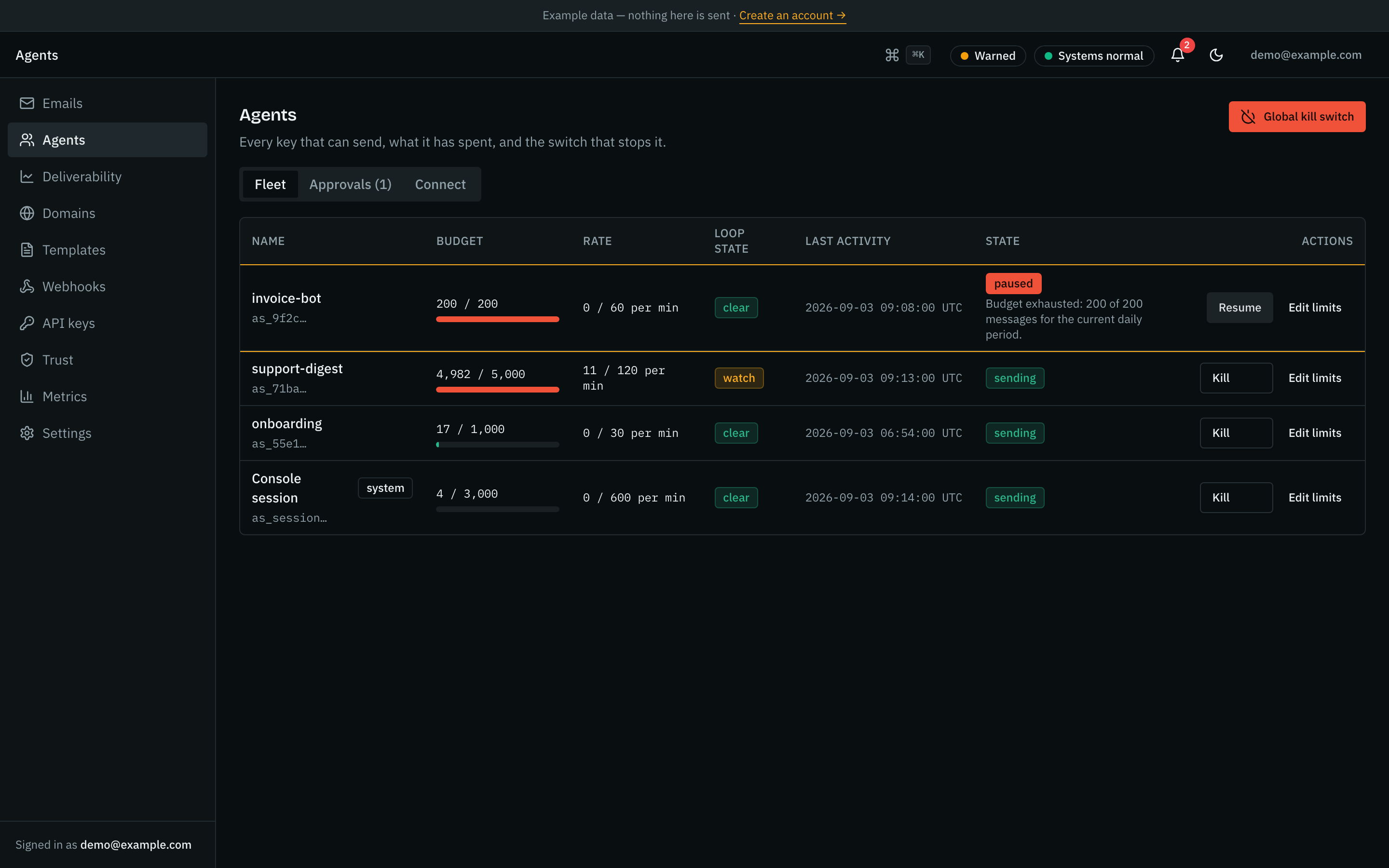
In Claude, and in other hosts that support MCP Apps, tool results can open in 4 interactive views. A view can only call tools the connection could already call.
| View | Opens from | What it shows |
|---|---|---|
| Emails | list_emails, get_email | Recent sends with status, filters by status, and a peek at any message with its delivery events. |
| Agents | list_api_keys, get_agent_budget, get_kill_switch_state | One row per API key with its send budget, per-minute ceiling, loop guard and 30-day sends; the budget meter and stop state of the key this connection uses; and a stand-down that shows its effect before it runs. |
| Domain setup | get_domain, verify_domain, create_domain, setup_domain | The DNS records a sending domain needs, each with the value to publish and its live status, and a button that checks DNS again. |
| Preflight | preflight_email | What a real send would get: the verdict, the refusal and its fix when there is one, and every gate with what it found. Sends nothing. |
A host without MCP Apps gets the same results as text and data.
Prompts and resources
The server also ships 6 ready prompts (send_first_test, send_safely, diagnose_delivery, set_up_domain, set_up_my_domain, stopped_what_now) and readable resources for the error list, the tool list, the limits, the guardrails, your domains, your templates and the sending thresholds.
Hosted or local
| Hosted URL | stdio package | |
|---|---|---|
| Install | None | Node.js and npx |
| Sign-in | OAuth or API key | API key |
| Tools and limits | All of them | The same ones, relayed |
| Works in Claude on the web | Yes | No |
| Use it when | Your client accepts a URL | Your client only starts local programs |
When something fails
| What you see | Fix |
|---|---|
| The client says it needs authentication | Run /mcp and sign in, or add the Authorization header |
| A URL entry in Claude Desktop's config does nothing | That file runs local programs only. Add a connector in Settings, or use the stdio block |
domain_not_verified | Ask the agent to run setup_domain, publish the records, then wait_for_domain. Test meanwhile with a simulator address |
| A tool you expected is missing | Call list_more_tools, or check the connection's permissions with whoami |
FAQ
Is the AgentiSend MCP server free?
The server comes with every plan, including the Free plan. The monthly and daily email figures are on the pricing page.
Can an agent send to anyone before I verify a domain?
No. Before a domain verifies, a test can go from the shared onboarding sender to your own sign-in addresses, or to a simulator address that reaches nobody.
Can it receive email?
Yes. Turn receiving on for a verified domain and the received-mail tools read it. See receiving email at your own domain.
Can it be used for cold email?
No. There is no tool for unsolicited mail, and sending to people who did not ask for it is against the rules of the service.
How is it different from the Resend MCP server?
Both are hosted and both send. AgentiSend adds a budget per key, server-held approvals, a kill switch and a free preflight. The Resend MCP server page compares them row by row, including where Resend's is simpler.