Questions · Published 2026-11-28 · Updated 2026-11-28 · AgentiSend
React Email MCP
A React Email MCP setup is an agent that writes a React Email component, renders it to HTML, and sends that HTML through an email MCP server.
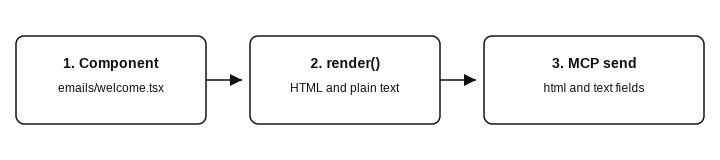
Neither Resend's MCP server nor AgentiSend's accepts the .tsx file. The component is rendered first. The MCP call carries the HTML and the plain text.
Resend facts on this page were read on 2026-11-28 from Resend's React Email skill page, the skill file in resend/resend-skills (metadata version 2.1.0), resend-mcp v2.31.0 (src/tools/emails.ts, src/tools/templates.ts, src/tools/editor.ts), the template guide, the CLI skill, and the npm registry. Package versions that day: react-email 6.11.17, @react-email/components 1.0.12, @react-email/render 2.3.1, resend-mcp 2.31.0. We did not sign in to Resend and we did not run npx skills add.
Install the React Email skill
Resend publishes the skill in two places, and the install lines differ.
| What you want | Command | Where that line is written |
|---|---|---|
| The React Email skill alone | npx skills add resend/react-email | resend.com/docs/react-email-skill |
| All five Resend skills, including this one | npx skills add resend/resend-skills | resend/resend-skills README |
The collection README says the react-email folder there is synced from resend/react-email. The canary branch of that repo has a skills/react-email directory. The discovery file at https://resend.com/.well-known/agent-skills/index.json lists the skill with the raw URL of the copy in resend-skills.
The skill's own install for the library, not the skill file, is npm i react-email. A new preview project is npx create-email@latest, which the template guide says creates a react-email-starter folder. The preview server in the skill is email dev --dir emails --port 3000.
AgentiSend does not publish a React Email skill. An agent can still use Resend's skill to write the component, then send the rendered HTML with our MCP server.
What the MCP server actually accepts
In resend-mcp 2.31.0, send-email has text (required) and html (optional). The schema says that when html is provided, the plain text argument must be provided as well. There is no react field and no path to a .tsx file. The recipient array is capped at 50.
The Node SDK is a different door. The skill and the template guide both show resend.emails.send({ react: <WelcomeEmail … /> }), and the skill says the SDK renders HTML and plain text from that element. That call is application code. It is not an MCP tool argument.
The CLI is a third door. The CLI skill's send line is:
resend emails send --from "you@domain.com" --to user@example.com --subject "Welcome" --react-email ./emails/welcome.tsxThat flag is the CLI reading a component file. send-email on the MCP server does not take it.
Stored templates on Resend are HTML as well. create-template describes its html field as using triple-brace placeholders, {{{VARIABLE_NAME}}}, and says a template is created as a draft until publish-template. The same file lists the tools list-templates, get-template, update-template, remove-template and duplicate-template. compose-template does not take JSX: its content field is TipTap JSON, and the description says to call get-tiptap-json-content with include_schema: true first. Switching a template between that JSON and raw HTML is described there as lossy.
The skill tells the agent the opposite brace style for the component itself: do not write a {{variableName}} placeholder in the JSX. Put the mustache string only in PreviewProps when a dashboard upload needs it, and read props in the elements ({props.variableName}). Those are two different files, and an agent that pastes the skill's PreviewProps braces into create-template is not following the tool schema.
The template guide's upload path is separate again: npx react-email@latest resend setup, then Upload from the preview server's Resend tab. The guide says that setup asks for an API key scoped to full access.
Render, then send on AgentiSend
Our MCP tool send_email takes html, text, or template_id. It does not take a React element. preflight_email takes the same body fields and sends nothing. A stored template is markdown, HTML or blocks with {{first_name}}-style names, rendered by render_template and by POST /templates/{id}/render. It is not a React Email component, and publishing it does not run render() from react-email.
The placeholder in our renderer is two braces around a name of letters, digits, underscores and dots. A required name with no value fails the render with Render failed: required variable "first_name" has no value. The fix on that error is to pass the value. An unknown name fails with the name in the message rather than sending a blank greeting. POST /templates creates the draft, POST /templates/{id}/publish freezes a version, and POST /emails sends it when you pass template_id instead of html. GET /templates lists them. The full rules are on How do I send an email from a template?.
For a one-off React Email message, render on the machine the agent is using, then pass the strings:
import { render } from 'react-email';
import { WelcomeEmail } from './emails/welcome';

const props = { firstName: 'Ada', productName: 'Acme' };
const html = await render(<WelcomeEmail {...props} />);
const text = await render(<WelcomeEmail {...props} />, { plainText: true });That import is the one the React Email skill documents. render also exists as its own package, @react-email/render 2.3.1. Use one of them in the project. Do not assume the MCP server has either package installed.
The send_email arguments for a check that reaches nobody:
{
  "from": "Acme <onboarding@agentisend.com>",
  "to": "delivered@simulator.agentisend.com",
  "subject": "Welcome",
  "html": "<html>…the render() result…</html>",
  "text": "Welcome, Ada"
}Addresses ending in @simulator.agentisend.com are the dry run: they cost nothing and reach nobody, including before a domain is verified. onboarding@agentisend.com delivers real mail only to the sign-in addresses on the account, with a daily cap, and it refuses cc, bcc, attachments, tracking and extra headers. A verified domain is the From for anyone else. One message allows 50 recipients. Gmail clips a message around 102 KB; keep the rendered HTML under that.
curl -sS -X POST https://api.agentisend.com/emails \
  -H "Authorization: Bearer $AGENTISEND_API_KEY" \
  -H "Idempotency-Key: $(uuidgen)" \
  -H "Content-Type: application/json" \
-d '{"from":"billing@yourdomain.com","to":"delivered@simulator.agentisend.com","subject":"Your receipt","text":"Thanks — the details are attached."}'201
{
"id": "9c8f8f0e-3d1a-4d3f-9a1e-2b7c1a0f5e42",
"simulated": true,
"warnings": []
}Ask the agent, after the server is connected:
Write emails/welcome.tsx as a React Email component. Props are firstName and productName. Use Html, Head, Preview, Body, Container, Heading, Text and Button. Render it with render() from react-email, once for HTML and once with plainText: true. Call preflight_email on the agentisend server from Acme <onboarding@agentisend.com> to delivered@simulator.agentisend.com with subject Welcome and those two bodies. If it passes, call send_email with the same fields. Do not create a template.Connect the server with the lines on the AgentiSend MCP server. The hosted URL is https://api.agentisend.com/mcp. The first tool list includes send_email, preflight_email, list_templates, render_template and publish_template among 48 tools, out of 117 on the server.
The browser renderer
React Email to HTML runs in the browser. Paste a component, and the page calls render() from @react-email/render twice: once for HTML and once with plainText: true. Import lines are dropped, because the elements are already in the worker. Tailwind is loaded only when the paste names it. The syntax-highlighting code block component is not in that worker. render() walks the function once, so effects do not run. The page does not send. It fills html and text on the POST /emails sample under the box.
That box is the right check when you want to see the tags before an agent calls send_email. It is the wrong check for a Resend dashboard template: it does not turn props into {{{VARIABLE_NAME}}} placeholders, and it does not call create-template.
Side by side
| Step | Resend, read 2026-11-28 | AgentiSend |
|---|---|---|
| Who writes the component | The React Email skill, version 2.1.0 in the skill file | The same React Email packages. We do not ship a skill for them |
| Render | render() from react-email, the SDK react prop, or the CLI --react-email flag | render() in your project, or the browser tool above |
| MCP send | send-email with required text and optional html. No React field | send_email with html, text, or both. preflight_email sends nothing |
| Reusable template | create-template HTML with {{{VARIABLE_NAME}}}, then publish-template. compose-template is TipTap JSON | POST /templates with {{first_name}} names, then POST /templates/{id}/publish, then template_id on POST /emails |
| Preview without sending | Preview server on port 3000, or get-template | POST /templates/{id}/render, or the browser tool for a React component |
| If the agent is unattended | The Resend MCP server page compares key scope and confirmation text | A budget on the key, a kill switch and preflight_email. Details on the AgentiSend MCP server |
curl -sS -X POST https://api.agentisend.com/templates/9c8f8f0e-3d1a-4d3f-9a1e-2b7c1a0f5e42/render \
  -H "Authorization: Bearer $AGENTISEND_API_KEY" \
  -H "Idempotency-Key: $(uuidgen)" \
  -H "Content-Type: application/json" \
-d '{"preview":true}'200
{
"missing_variables": [],
"rendered": "example",
"subject": "example",
"text": "example"
}Prices and the free-plan counts stay on Resend alternative pricing and pricing. This page does not repeat them.
FAQ
Does an MCP server render a React Email component?
No. Resend's send-email tool in resend-mcp 2.31.0 takes HTML and plain text. AgentiSend's send_email tool takes HTML, plain text, or a published template id. Rendering is a render call in your project, the Resend Node SDK's react prop, the Resend CLI react-email flag, or the browser tool on this site.
Which command installs the React Email skill?
The line on Resend's React Email skill page is npx skills add resend/react-email. The command npx skills add resend/resend-skills installs that skill together with the other four in the collection.
Why do some templates use three braces and some use two?
Resend's create-template tool tells the model to write a triple-brace VARIABLE_NAME placeholder in HTML. The React Email skill tells the model to keep mustache strings out of the JSX and to put them in PreviewProps only when an upload needs them. AgentiSend templates use two braces around a name such as first_name, and those names are not React props.
Can I upload a React Email file into an AgentiSend template?
No. POST /templates stores markdown, HTML or blocks. Render the component to HTML yourself and put that HTML in the template source, or send the HTML on POST /emails and skip the template.
What is the difference between the React Email skill and the MCP server?
The skill is a markdown file the agent reads before it writes a component. The MCP server is the tool list that sends mail and, on Resend, stores templates. Installing the skill does not register the server, and connecting the server does not install the skill. Resend's plugin repository does both when the client installs the plugin.